Total Privacy
Your files stay on your PC. Nothing is uploaded to the cloud.
Features
Use powerful AI models directly on your own hardware.
Your files stay on your PC. Nothing is uploaded to the cloud.
Use powerful AI models directly on your own hardware.
Translate with any language supported by the compatible local model you load.
Translate full chapter folders automatically with one click.
Choose monthly, yearly, or lifetime. You decide.
No GPU? It can also run on CPU, with lower speed.
WORKFLOW
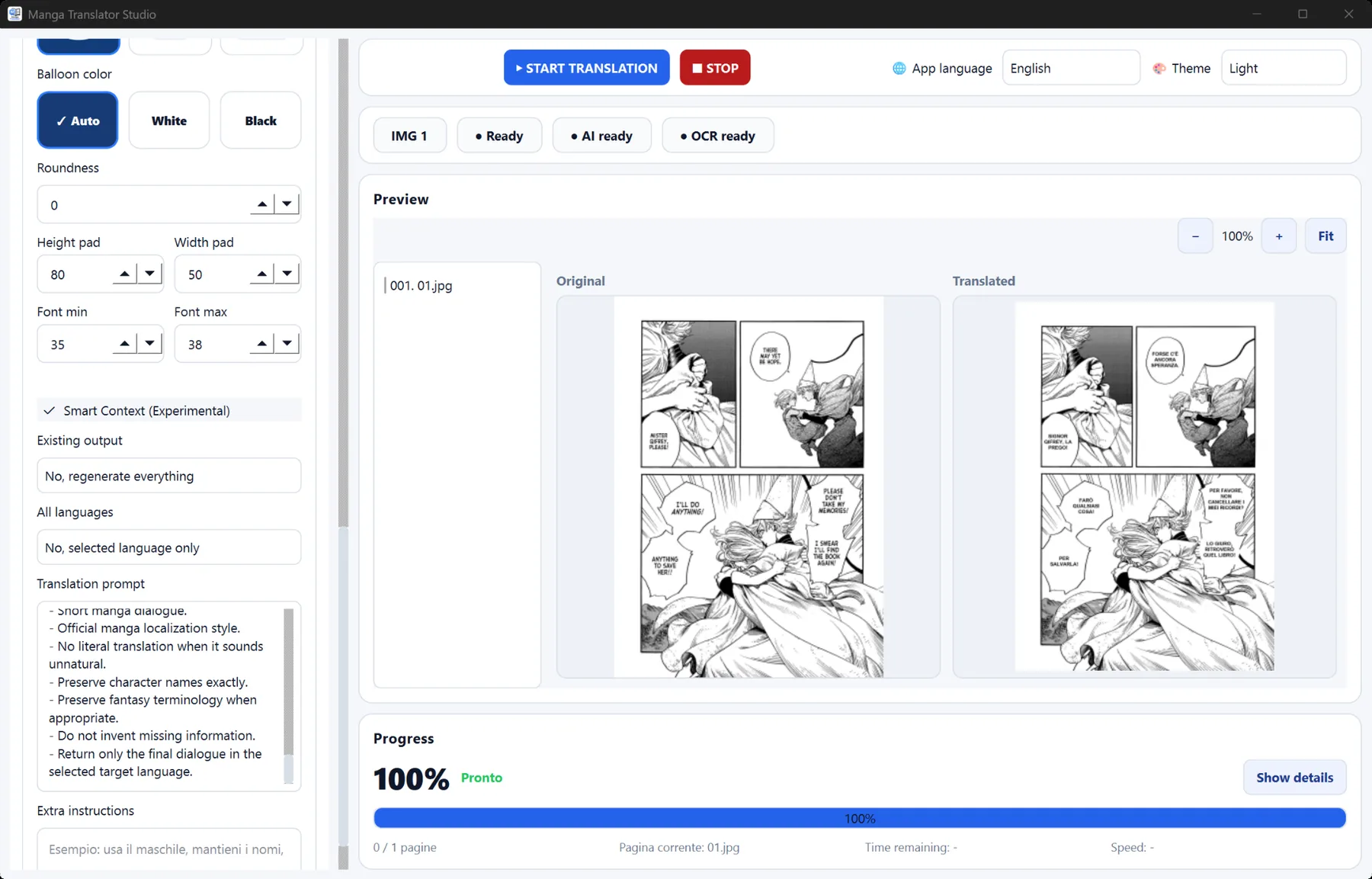
Manga Translator Studio combines page selection, text recognition, local translation and output rendering in one Windows workflow. Start with a few representative pages, verify the source language and OCR results, then save the settings that work for the series.
Choose the manga folder, select the output folder, choose a target language and press Start Translation. The free trial lets you test the full workflow.
Text recognition reads text inside speech bubbles. EasyOCR is useful for English scans; MangaOCR is better for Japanese source text.
Smart Comic Context helps the model keep terminology, tone and character names consistent across nearby pages.
For better results, review unusual lettering, very small speech bubbles and pages with text over artwork. Translation quality depends on readable source images, correct OCR and a model suitable for the source and target languages.